
TILTRUNE
Tilt the vault. Read the fall. Find the exit.
The room is your mechanism. Turn it through 90 degrees and the explorer, crates and gems fall into a new arrangement. A wall that stopped you can become your next floor. Collect every gem, then reach the green exit.
Push a crate into place, turn a dangerous drop into a safe landing and plan one tilt ahead. Explore 80+ main rooms across five vaults, a special final chamber and bonus challenges beyond the ending. Experiment with up to 100 stored undo states and unlimited retries.
Your next adventure
Gravity is your tool
Rotate the whole room left or right, push crates and collect falling gems. Read the next landing before you tilt; falling crates and spikes can end an attempt.
Five vaults and beyond
Solve 80+ main rooms, reach the final chamber and unlock bonus challenges. Chase par targets, stars and your best room results.
Ten-room free demo
Try the first ten rooms of the Sandstone Vault. The remaining playable rooms, later vaults, final reward and disk-saving backend are physically omitted.
See it in motion
Actual C64 gameplay. Play a clip when you want to take a closer look.
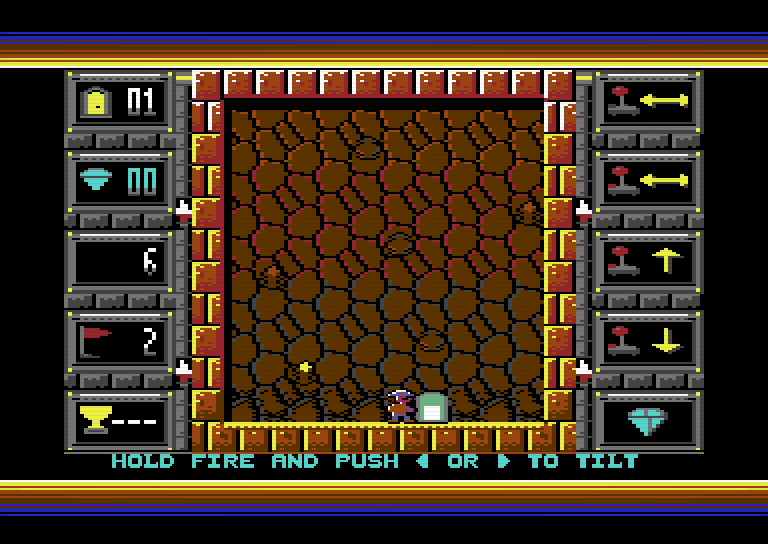
Turn the Sandstone Vault and find a new way to the exit.
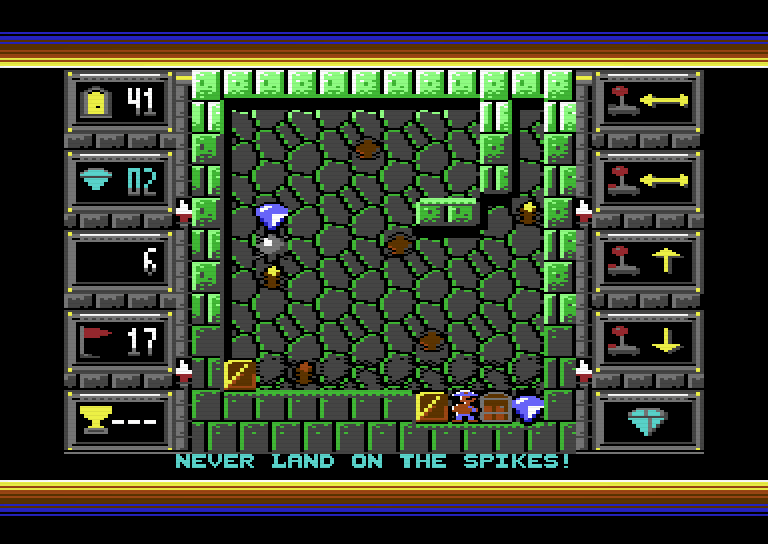
Plan the next fall among the green walls of the Jade Vault.
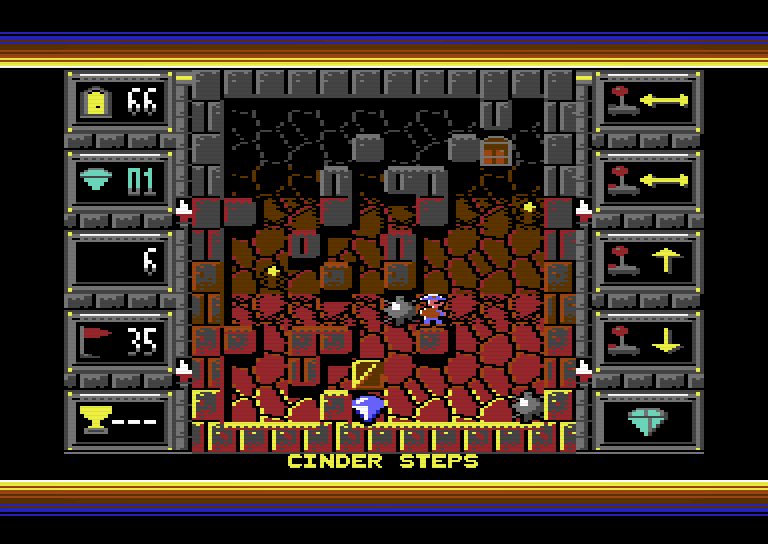
Take on the fiery Molten Vault later in the full game.
Before you play
Formats & controls
D64 disk image, standalone PRG and 32 KB Magic Desk CRT for compatible C64 hardware or a suitable emulator. Tested on THEC64 Maxi and THEC64 Mini. PAL recommended. CRT playback requires Magic Desk compatibility. Joystick in either port, or W/A/S/D + SPACE; FIRE + LEFT/RIGHT tilts, FIRE + UP or U undoes, FIRE + DOWN or R restarts (hold while alive). No emulator or Commodore ROMs are supplied.
Progress & saving
Full-game records require a writable disk or disk image in drive 8, including when playing from PRG or CRT. Records save at vault boundaries, the ending and the end of the bonus sequence; the game also attempts to save on a confirmed return to the title. The active room and undo history are not saved after power-off. Keep a private offline backup of your record disk. Demo progress lasts for the current session only.
License & terms — before you buy
Read the complete documents below, or download each TXT file individually. Full-game and demo documents are kept separate.
Short summary
Personal play on compatible devices you own, with at most one playable copy per device and one private offline backup. Personal printing is permitted. Gameplay streams, videos and screenshots are allowed, including monetized channels. Redistribution of playable files, artwork or documents, modification and other commercial use require written permission, subject to applicable law. AS IS wording applies only to the extent permitted by law; mandatory consumer rights remain unaffected.
The free demo license covers the demo only. This summary does not amend the documents below. Downloading or reading them is not itself acceptance of terms.
A newer package does not automatically replace the terms agreed for an earlier purchase. Keep your applicable documents and review changes before accepting an optional update.
Full game
LICENSE.txt
Download this text fileTILTRUNE - PERSONAL USE LICENSE Terms revision: 2026-10-16 Copyright © 2026 Majoros Gábor, publishing as Gaboo Arts Entertainment. All rights reserved. 1. PERMITTED USE Your purchase permits you to play the supplied game for personal use on compatible devices you own, with no more than one playable copy of the game on each device. You may use all compatible devices you own. You may copy the game files onto media needed to play on those devices and keep one private, offline backup. You may print the supplied manual, cover, disk sleeve and other printable materials for your own personal use with your licensed copy. This does not permit selling printed copies or distributing the printable files. You may stream gameplay and publish gameplay videos and screenshots, including on monetized channels. This permission does not include sharing the playable game files or distributing the artwork files themselves. 2. RESTRICTIONS Without written permission from Gaboo Arts Entertainment, you may not copy the game files for others; share, upload, sell, rent, lend, or redistribute any game file, cover, manual, or printable sleeve, alone, in a bundle, or as part of a collection or compilation; modify the game; or distribute a modified version of it. Except for the gameplay streams, videos, and screenshots expressly permitted above, you may not use the supplied game or accompanying files for any commercial purpose without written permission. Please support the developer by asking others to buy their own copy. Your purchase does not transfer copyright. Restrictions apply only to the extent permitted by applicable law. They do not restrict any mandatory right to make a necessary backup, observe, study or test the program, obtain interoperability information, or exercise other rights that cannot lawfully be restricted by contract. Any applicable exhaustion or resale rights are also preserved. Third-party notices, if applicable, remain governed by their own licenses separately from these game-use terms. 3. CONTENT AND ATTRIBUTION The game uses a custom bitmap typeface and SID music. The supplied PDF documents refer to standard PDF base fonts and do not embed or distribute font files. The package does not include an emulator or Commodore ROM files. Generative AI assisted development of the code, music, cover illustrations, and documentation under Majoros Gábor's direction. No generative AI runs during gameplay. Commodore, Commodore 64, THEC64, and other product names are used only to identify compatible systems and belong to their respective owners. This game is an independent release and is not affiliated with or endorsed by those owners. 4. WARRANTY AND LIABILITY To the fullest extent permitted by applicable law, the game and all accompanying files are provided "AS IS", without warranties of any kind, express or implied, including merchantability, fitness for a particular purpose and non-infringement. To the same extent, the copyright holder shall not be liable for any claims, damages or losses arising from the use of, or inability to use, the game or accompanying files, including loss of data or profits and direct, indirect, incidental or consequential damages, even if advised of their possibility. Nothing in this license excludes or limits mandatory consumer rights, legal guarantees, remedies, or any warranty or liability that cannot lawfully be excluded or limited. 5. UPDATES AND CURRENT TERMS These license terms and the Terms of Use may change to clarify permitted use, reflect changes to the game or its distribution, or comply with law. The latest edition is LICENSE.txt and TERMS-OF-USE.txt supplied in the latest downloadable package on the official TILTRUNE itch.io store page operated by Gaboo Arts Entertainment. That edition is offered for new purchases and, where lawfully agreed, updates. Uploading a newer package does not automatically replace the terms agreed for an earlier purchase. It is your responsibility to check the official itch.io store page for the latest package and review LICENSE.txt and TERMS-OF-USE.txt before purchasing or accepting changed terms for an optional update. Keep the documents that apply to your purchase and any accepted updates. Continuing to use an older copy, silence, or failing to read a notice does not by itself mean acceptance of new terms. You do not have to stop using your existing licensed copy solely because you decline new terms offered for an optional update. Material changes will identify what changes, whom they affect and their effective date, in a notice you can save. An existing agreement can change only on a valid legal basis and through the notice, agreement or other procedure required by applicable law. A store-page announcement alone is not a substitute for individual notice or a durable medium where required. Nothing in this update clause limits mandatory consumer rights, legal guarantees or other rights that cannot lawfully be excluded or restricted. Access to updates required by law for conformity or security is not made conditional on giving up those rights or accepting unrelated new terms. Questions or permission requests: use the seller contact channel in the store where you obtained the game, or https://gabooarts.com/#contact.
TERMS-OF-USE.txt
Download this text fileTILTRUNE - TERMS OF USE Terms revision: 2026-10-16 Copyright © 2026 Majoros Gábor / Gaboo Arts Entertainment. 1. DOCUMENTS AND PERSONAL USE These Terms of Use accompany LICENSE.txt in this game package. Read both. LICENSE.txt defines permitted personal use, device copies, private backup, personal printing, gameplay-video permission, restrictions, attribution and warranty/liability terms. Your purchase does not transfer copyright. 2. LATEST EDITION AND REVIEW BEFORE PURCHASE OR OPTIONAL UPDATE Terms may change to clarify permitted use, reflect changes to the game or its distribution, or comply with law. The latest edition is LICENSE.txt and TERMS-OF-USE.txt in the latest downloadable package on the official TILTRUNE itch.io store page operated by Gaboo Arts Entertainment. Review that store page and the documents before purchasing or accepting changed terms for an optional update. The latest edition is offered for new purchases and, where lawfully agreed, updates. Uploading a newer package does not automatically replace the terms agreed for an earlier purchase. Keep the documents that apply to your purchase and any accepted updates. 3. NOTICE AND ACCEPTANCE OF CHANGES Material changes will identify what changes, whom they affect and their effective date, in a notice you can save. An existing agreement can change only on a valid legal basis and through the notice, agreement or other procedure required by applicable law. A store-page announcement alone is not a substitute for individual notice or a durable medium where required. Continuing to use an older copy, silence, or failing to read a notice does not by itself mean acceptance of new terms. You do not have to stop using your existing licensed copy solely because you decline new terms offered for an optional update. 4. TECHNICAL USE AND RECORDS Use a compatible C64 system or emulator and your own authorized media. The package does not include an emulator or Commodore ROM files. CRT playback requires a Magic Desk-compatible cartridge system or emulator. Full-game records require a writable disk or disk image in drive 8, including when starting from PRG or CRT. Records save at vault boundaries, the ending and the end of the bonus sequence; the game also attempts to save on a confirmed return to the title. Active room positions and undo history are not preserved after power-off. Keep a private offline backup of your record disk. Read the manual and KNOWN-ISSUES.txt for setup and record-file limits. 5. WARRANTY, LIABILITY AND MANDATORY RIGHTS The AS IS warranty/liability terms in LICENSE.txt apply to the extent permitted by law. Nothing in either document excludes or restricts mandatory consumer rights, legal guarantees or liability that cannot lawfully be excluded or limited. Access to updates required by law for conformity or security is not made conditional on giving up those rights or accepting unrelated new terms. 6. SUPPORT AND PERMISSION REQUESTS Use the seller contact channel on the official TILTRUNE itch.io store page where you obtained the game. No other seller or mirror is authorized to change these publisher terms. You may also contact Gaboo Arts Entertainment directly at https://gabooarts.com/#contact.
Free playable demo
LICENSE.txt
Download this text fileTILTRUNE - FREE DEMO PERSONAL USE LICENSE Terms revision: 2026-10-16 Copyright © 2026 Majoros Gábor, publishing as Gaboo Arts Entertainment. All rights reserved. 1. PERMITTED USE Your legitimate download permits you to play this free demo for personal use on compatible devices you own, with no more than one playable copy of the game on each device. You may use all compatible devices you own. You may copy the game files onto media needed to play on those devices and keep one private, offline backup. You may print the supplied manual, cover, disk sleeve and other printable materials for your own personal use with your licensed copy. This does not permit selling printed copies or distributing the printable files. You may stream gameplay and publish gameplay videos and screenshots, including on monetized channels. This permission does not include sharing the playable game files or distributing the artwork files themselves. 2. RESTRICTIONS Without written permission from Gaboo Arts Entertainment, you may not copy the game files for others; share, upload, sell, rent, lend, or redistribute any game file, cover, manual, or printable sleeve, alone, in a bundle, or as part of a collection or compilation; modify the game; or distribute a modified version of it. Except for the gameplay streams, videos, and screenshots expressly permitted above, you may not use the supplied game or accompanying files for any commercial purpose without written permission. Please support the developer by directing others to the official store to download the demo or buy the full game. Downloading this demo does not transfer copyright. Restrictions apply only to the extent permitted by applicable law. They do not restrict any mandatory right to make a necessary backup, observe, study or test the program, obtain interoperability information, or exercise other rights that cannot lawfully be restricted by contract. Any applicable exhaustion or resale rights are also preserved. Third-party notices, if applicable, remain governed by their own licenses separately from these game-use terms. 3. CONTENT AND ATTRIBUTION The game uses a custom bitmap typeface and SID music. The supplied PDF documents refer to standard PDF base fonts and do not embed or distribute font files. The package does not include an emulator or Commodore ROM files. Generative AI assisted development of the code, music, cover illustrations, and documentation under Majoros Gábor's direction. No generative AI runs during gameplay. Commodore, Commodore 64, THEC64, and other product names are used only to identify compatible systems and belong to their respective owners. This game is an independent release and is not affiliated with or endorsed by those owners. 4. WARRANTY AND LIABILITY To the fullest extent permitted by applicable law, the game and all accompanying files are provided "AS IS", without warranties of any kind, express or implied, including merchantability, fitness for a particular purpose and non-infringement. To the same extent, the copyright holder shall not be liable for any claims, damages or losses arising from the use of, or inability to use, the game or accompanying files, including loss of data or profits and direct, indirect, incidental or consequential damages, even if advised of their possibility. Nothing in this license excludes or limits mandatory consumer rights, legal guarantees, remedies, or any warranty or liability that cannot lawfully be excluded or limited. 5. UPDATES AND CURRENT TERMS These license terms and the Terms of Use may change to clarify permitted use, reflect changes to the game or its distribution, or comply with law. The latest edition is LICENSE.txt and TERMS-OF-USE.txt supplied in the latest downloadable demo package on the official TILTRUNE itch.io store page operated by Gaboo Arts Entertainment. That edition is offered for new demo downloads and, where lawfully agreed, updates. Uploading a newer package does not automatically replace the terms agreed for an earlier download. It is your responsibility to check the official itch.io store page for the latest package and review LICENSE.txt and TERMS-OF-USE.txt before downloading the demo or accepting changed terms for an optional update. Keep the documents that apply to your demo download and any accepted updates. Continuing to use an older copy, silence, or failing to read a notice does not by itself mean acceptance of new terms. You do not have to stop using your existing licensed copy solely because you decline new terms offered for an optional update. Material changes will identify what changes, whom they affect and their effective date, in a notice you can save. An existing agreement can change only on a valid legal basis and through the notice, agreement or other procedure required by applicable law. A store-page announcement alone is not a substitute for individual notice or a durable medium where required. Nothing in this update clause limits mandatory consumer rights, legal guarantees or other rights that cannot lawfully be excluded or restricted. Access to updates required by law for conformity or security is not made conditional on giving up those rights or accepting unrelated new terms. Questions or permission requests: use the seller contact channel in the store where you obtained the game, or https://gabooarts.com/#contact.
TERMS-OF-USE.txt
Download this text fileTILTRUNE - FREE DEMO TERMS OF USE Terms revision: 2026-10-16 Copyright © 2026 Majoros Gábor / Gaboo Arts Entertainment. 1. DOCUMENTS AND PERSONAL USE These Terms of Use accompany LICENSE.txt in this game package. Read both. LICENSE.txt defines permitted personal use, device copies, private backup, personal printing, gameplay-video permission, restrictions, attribution and warranty/liability terms. Downloading the demo does not transfer copyright. 2. LATEST EDITION AND REVIEW BEFORE DOWNLOAD OR OPTIONAL UPDATE Terms may change to clarify permitted use, reflect changes to the game or its distribution, or comply with law. The latest edition is LICENSE.txt and TERMS-OF-USE.txt in the latest downloadable demo package on the official TILTRUNE itch.io store page operated by Gaboo Arts Entertainment. Review that store page and the documents before downloading the demo or accepting changed terms for an optional update. The latest edition is offered for new demo downloads and, where lawfully agreed, updates. Uploading a newer package does not automatically replace the terms agreed for an earlier download. Keep the documents that apply to your demo download and any accepted updates. 3. NOTICE AND ACCEPTANCE OF CHANGES Material changes will identify what changes, whom they affect and their effective date, in a notice you can save. An existing agreement can change only on a valid legal basis and through the notice, agreement or other procedure required by applicable law. A store-page announcement alone is not a substitute for individual notice or a durable medium where required. Continuing to use an older copy, silence, or failing to read a notice does not by itself mean acceptance of new terms. You do not have to stop using your existing licensed copy solely because you decline new terms offered for an optional update. 4. TECHNICAL USE AND RECORDS Use a compatible C64 system or emulator and your own authorized media. The package does not include an emulator or Commodore ROM files. CRT playback requires a Magic Desk-compatible cartridge system or emulator. This free demo contains the first ten rooms of the Sandstone Vault. Opened rooms and results last for the current session only; the demo does not write disk records. A fresh load/start clears progress. Returning to the title does not preserve an active room or undo history. Read the Demo guide and BUILD-NOTES.txt for setup and build information. 5. WARRANTY, LIABILITY AND MANDATORY RIGHTS The AS IS warranty/liability terms in LICENSE.txt apply to the extent permitted by law. Nothing in either document excludes or restricts mandatory consumer rights, legal guarantees or liability that cannot lawfully be excluded or limited. Access to updates required by law for conformity or security is not made conditional on giving up those rights or accepting unrelated new terms. 6. SUPPORT AND PERMISSION REQUESTS Use the seller contact channel on the official TILTRUNE itch.io store page where you obtained the game. No other seller or mirror is authorized to change these publisher terms. You may also contact Gaboo Arts Entertainment directly at https://gabooarts.com/#contact.
Exact copies of the legal documents in the corresponding full-game and demo releases. Copyright © 2026 Majoros Gábor / Gaboo Arts Entertainment.